Brodcastr finds the topic, writes the script, adds voice, visuals and captions, and posts short- and long-form videos to your channels on autopilot. Set it up once and it keeps posting.
7-Day Money-Back GuaranteeReview first or autopublishTrusted by 10K+ creators
Perfect for
What we create
More video formats. More ways to create.
How Brodcastr works
From content idea to growing channel in four steps.
01
Find a winning topic or bring your own idea
Search for trending videos, keywords, and hashtags in your niche, or start with something you already have.
Start with
A topic or written promptA trending social videoAn articleA voiceover or audio fileYour own uploaded footage
brodcastr.ai/research
budget travel h
YouTubeTikTokInstagram
Min views 100K+
WINNING2.4M
918K
641K
#stoicism ↑ 312%#mindset ↑#dailywisdom ↑
02
Turn it into a short or long-form video
Choose the type of video your channel needs. Brodcastr can write the script, create the narration, generate the visuals, add captions, and prepare the finished video.
You control
Short-form or long-form
Visual style and video model
Voice, captions, music, and quality
Script approval before generation
brodcastr.ai/create
Short · 9:16Long · 16:9
StyleCinematic
ModelVeo 3.1
VoiceAria · warm
Captions
Script ready · 142 wordsApprove
Ready · 0:58
03
Schedule it across your connected channels
Assign the video to a channel profile, select its social destinations, and decide whether to review it or publish automatically.
Publish using
Manual creation or Batch Mode
Review before publishing or autopublish
Automatic scheduling
Facebook, Instagram, TikTok, YouTube, and Pinterest
brodcastr.ai/schedule
Timeless Tales
History · 4 destinations
Profile
Review firstAutopublish
Mon
Tue
Wed
Thu
Fri
Sat
Sun
04
See what gets views and create more winners
Track how each video performs across your connected platforms. Identify the topics, formats, and channels getting the strongest response, then use those results to guide your next videos.
Measure
Views and reachLikes, comments, shares, and engagementFollower growthBest posting timesWhich videos and platforms deserve more content
brodcastr.ai/analytics
Sample dataBest time to post · Tue 7 PM
Views1,284K↑ 38%
Engagement7.9%↑ 1.2
Followers+12.4K↑ 24%
512K
384K
271K
117K
What’s inside
One tool, from idea to published video.
Research, video creation, scheduling and analytics, without switching between apps.
Live intel
Find topics that are already getting views.
Brodcastr helps you find videos, topics and hashtags earning views before you spend time generating content. Search your niche once or set recurring scouts to keep bringing fresh opportunities back to you.
Search YouTube, TikTok and Instagram by keyword.
Filter by time period and minimum view count.
Monitor a niche repeatedly and turn discoveries into new prompts.
Start from observable audience demand instead of another blank prompt.
Start with a written idea, a social-video URL or your own footage. Brodcastr transforms it into channel-ready short-form content, generates the title and description, and prepares it for review, scheduling or automatic publishing.
Create from prompts, URLs or uploaded videos.
Choose the generation model, duration, resolution and output shape.
Send the finished video to Facebook, Instagram, TikTok or YouTube.
One source can become a new, original angle for every channel you run.
Give Brodcastr a topic, article, voiceover or audio file. It can write the script, create the narration, build the visual scenes and prepare an editable video using the style and format selected for your channel.
Start from a prompt, article, voiceover, audio file or talking avatar.
Use moving AI images or generated video clips for each scene.
Save your voice, captions, style and quality settings for the next episode.
Pause for script approval before generation, or reuse a proven setup with one click.
Each Brodcastr profile acts as the operating home for a channel brand. Keep its content, destinations, publishing workflow and analytics together while switching between every faceless property you manage.
Connect Facebook, Instagram, TikTok, YouTube and Pinterest accounts.
Reuse each profile across creation, batches, scheduling and analytics.
Manage different niches and channel identities without mixing their workflows.
Built for operators managing brands, not only creators posting to one feed.
Create one video when you need precision, or queue an entire content pipeline when you are ready to scale. Brodcastr carries the selected profile, model, format, metadata and publishing rules across the batch.
Batch from social URLs, uploaded videos or CSV prompt lists.
Apply consistent creation and publishing settings across the queue.
Queue up to 500 content jobs from the operating dashboard.
Scale the process instead of the repetitive setup work.
A calendar tells you what is scheduled. Brodcastr also tells you how long each channel can keep publishing. See which profiles are empty, running low, looking good or well stocked, then refill the right pipeline before consistency breaks.
See queued items and stocked publishing days by profile.
Filter the calendar by channel, platform, status, media type and source.
Review scheduled, published and failed posts from the same workspace.
Turn content consistency into something you can see and manage.
The same idea can win on one platform and stall on another. Brodcastr brings each profile’s performance into one place so you can compare the response, identify the platform-format combinations showing traction and direct the next production cycle toward stronger signals.
Compare views, reach, likes, comments, shares and engagement by post.
Track follower movement, posting frequency and performance decay.
See recommended posting times and compare the same creative across networks.
Publishing everywhere creates the tests. Analytics tells you what deserves to scale.
Many video platforms sell AI generations through their own credit packages. Brodcastr chose a different model: pay your API provider directly for every generation, with no markup from us.
Common platform model
Pay through platform credits
Buy AI credits directly from the software. Rates may include an added platform markup.
When your credits run out, generation stops until you buy more.
VS
Brodcastr’s BYOK model
Connect your own API key
Pay your AI provider directly for each generation. Brodcastr adds no markup to your API usage.
No Brodcastr generation limits.
Why Brodcastr chose BYOK
“We did not want Brodcastr credits to decide when you must stop creating.”
BYOK means Bring Your Own Key. It lets you pay your provider directly, use the balance you control, and avoid Brodcastr markup on every generation.
How it works
01
Open your API provider account
Create an API provider account and add funds. Review current rates before generating videos.
02
Add your key once
Copy your API key. Paste it inside your Brodcastr settings.
03
Create with clear costs
Choose your model and video settings. Your API provider charges for each generation. Brodcastr adds no usage markup.
What changes your cost
Your API cost depends on your choices
AI modelEach model uses its own provider rate.
Video lengthLonger generations may cost more.
Video qualityHigher settings may change the generation cost.
Number of videosMore videos use more of your provider balance.
Brodcastr markup$0 added to your API usage.
Direct provider billingPay your API provider through your own account.
No Brodcastr markupWe add $0 to your API usage.
Clear cost controlChoose your model, length, and quality.
Simple key setupConnect your API key inside Brodcastr.
Pricing
Pick your plan. Start creating today.
Simple plans for solo creators, growing teams, and busy agencies. One payment. Lifetime access.
Every plan comes with a 7-day money-back guarantee. Generate your videos, publish them, see the results for yourself. If Brodcastr AI isn't the right fit, email us within 7 days and we'll refund you in full. No hoops, no hurdles, no questions asked.
You pay once for Brodcastr and keep access, with no monthly or yearly fee. AI generation is separate: your own AI provider bills it at their rates, and only when you make a video.
Why do I need my own API key? Is it technical?
The key is what removes the monthly fee. Tools that bundle AI usage charge a subscription and give you credits that run out. With your own key you pay only for the videos you generate, with no markup from us and no credits to expire. Setup is copy and paste, takes less than 5 minutes, and our guide shows every step.
What does it cost to make a video?
A 60-second short costs less than $1 in generation, billed by your AI provider. Longer videos cost more, and the price changes with the model and quality you choose. Brodcastr adds nothing on top.
Can I try it before I commit?
There is no free trial, but every plan has a 7-day money-back guarantee. Make videos, post them and judge the results. If it isn’t right, email [email protected] within 7 days of purchase for a full refund of your plan. Charges from your AI provider are paid to them and aren’t part of the refund.
What is Auto Mode, and what is a series?
A series is one ongoing show for a channel: a niche, a style and a posting schedule. In Auto Mode, Brodcastr picks each topic, writes the script, creates the video and posts it on schedule. You set a series up once.
Do I really not have to do anything?
After setup, a series can run without you. You can also switch on review for scripts or finished videos, so nothing posts until you approve it. You still choose the niche and angle, check quality in the first weeks and reply to your audience.
Can I monetize videos made with Brodcastr?
Yes. YouTube, Instagram, Facebook and the other major platforms don’t ban AI-made or faceless videos; they look for original content that gives viewers something worth watching. Brodcastr is built for that: every video gets its own script, voice and visuals, and you can review or edit anything before it posts. Pick a clear niche and keep your topics varied, which is what the platforms look for. Each platform runs its own monetization program, so check the requirements for the ones you post to.
Are the videos unique?
Yes. Every video is generated from scratch with its own script, voiceover and visuals, so you’re not posting a template with the words swapped. In Auto Mode, each series draws on a pool of fresh topics for your niche, and you can review or edit any video before it goes out.
What kinds of videos can I make, and how long?
Short-form videos up to 1 minute and long-form videos up to 15 minutes, both faceless. You choose the visual style, voice, captions and music for each series.
Which platforms does it post to?
YouTube, TikTok, Instagram, Facebook and Pinterest. Brodcastr writes the title, description and hashtags for each post and publishes on your schedule, either after your review or automatically.
How many profiles and accounts do I get?
A profile is one channel brand, and each profile connects up to 5 social accounts. The number of profiles depends on your plan. If you need more, you can add 5 profiles (25 more connected accounts) for $49.99, or extra Auto Mode series, at checkout.
Can I edit a video after it’s made?
Yes. The built-in editor lets you trim and reorder clips, edit captions and on-screen text, replace a clip or change the music. You fix the part you don’t like without generating the video again.
How does Batch Mode work?
Upload a CSV with up to 500 prompts, one video idea per row. Brodcastr creates a separate video for each and sends them to your review list or straight to your schedule. Total time depends on video length and your AI provider.
How much storage do I get?
5 GB on Starter, 10 GB on Growth and Pro, and 25 GB on Agency. Videos you’ve already posted stay on your channels.
Do I own the videos?
Yes. Videos you create are yours to publish and use commercially. Your AI provider’s terms also apply to what it generates, and you’re responsible for any footage or audio you upload.
From the founder
A personal note from the founder.
Why we built Brodcastr
We built Brodcastr because making one video had started to feel like ten different jobs.
An idea lived in one app. The script lived in another. Creating, editing, resizing, and publishing meant even more tools.
Our team faced the same problem while managing video accounts of our own.
So we built a simpler way.
You choose what to create and where it should go. Brodcastr handles the repeated production work.
1
Set the direction
Use Live Intel, enter your own idea, or upload up to 500 prompts in one CSV.
Live IntelYour ideaCSV · 500
2
Let Brodcastr build the content
Brodcastr generates the video drafts and can add AI voiceovers and on-screen captions. It also prepares content for your selected video formats.
3
Choose review or direct publishing
Send finished videos to your review list, or let Brodcastr schedule and publish them across your connected social accounts.
ReviewPublish
That simpler process became Brodcastr.
We also made a clear choice about AI costs
Brodcastr uses BYOK, which means Bring Your Own Key. You connect your own API key and pay your chosen provider directly. Brodcastr adds no markup to your video generation costs.
Why? Because your usage should stay in your control. You should see where your money goes. And you should only pay for what you use.
Your Brodcastr plan pays for the workflow. Your provider balance pays for video generation.
We would rather earn through the workflow we built, not by adding extra charges to every generation.
Brodcastr cannot promise every video will become a hit. No honest tool can.
But it can remove slow, repeated work. It can help you test more ideas. And it can make consistent publishing easier.
If you are ready to stop juggling apps and build a repeatable video workflow, we would love to help.
MohyCEO and Founder, Brodcastr
Run faceless channels on autopilotOne payment · Lifetime access · 7-day money-backGet Lifetime Access


 WINNING2.4M
 918K
918K 641K
641K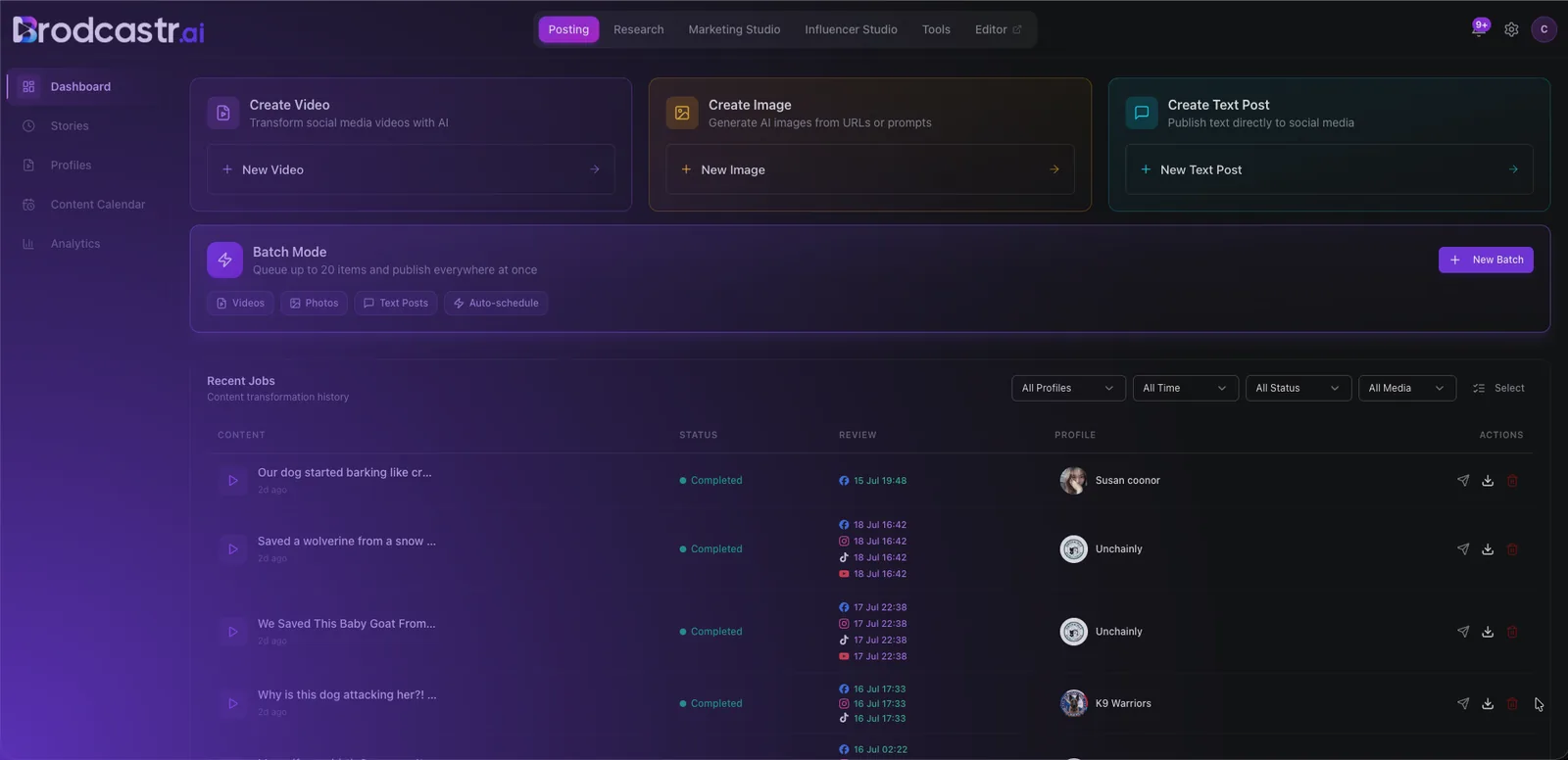



 way
way